Reverse-engineering a luxury brand into editable and reusable components
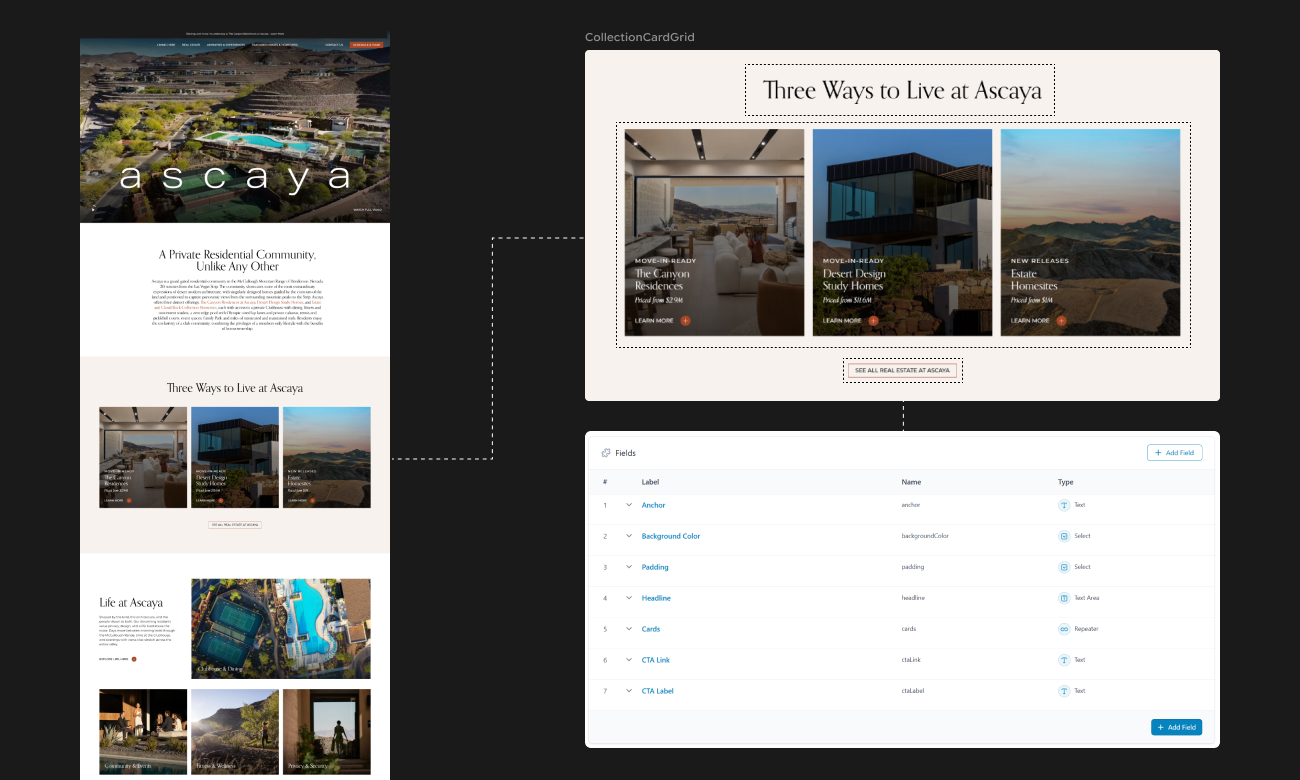
Ascaya is a guard-gated luxury community in Henderson, Nevada, with homes and homesites listed into the tens of millions. When Wicked+ won the redesign, I owned the technical side: turning the Figma into a component system, structuring the CMS, building the headless site and connecting the forms to the client’s CRM.
I led the kickoff with the designer, walking through every page to confirm interactions and catch inconsistencies while they were still cheap to fix.
I had 6 weeks to turn 20 designed pages into a live site the content team could run without me.

Design audit
Reading the design
Before writing any code, I grouped similar sections across every artboard to decide which could share one flexible component and which worked better as their own.
Combining too few sections fills the CMS with one-off blocks, and combining too many buries editors in conditional fields.
Component system
Planning every component before the build
- Labeled every section with a component name and its ACF fields.
- Rated each component’s build cost, low (1–2 hrs) or high (4–8 hrs), so the agency could see where the budget went and make scope calls before the build started.
- Drew a component tree for every page, from page to component to sub-component.

The main site landed at 25 flexible components, plus a blog set and header, footer and modal systems. It launched with 31 pages, but only 20 were designed. I built the other 11 straight from the system: some from rough wireframes the CEO sent mid-project, others, like policy pages, from existing templates. None of them needed new design, new components or a change order.
That’s how I knew the system worked.

Content Model
Modeling content for the editors
Ascaya has four kinds of listings (112 homesites, 6 Desert Design Study homes, 6 Canyon Residences and 11 amenities), plus 127 blog posts, 22 press items and an FAQ. Each needs a different display: tables, grids, floor plans and an interactive map.
The shortcut would have been one post type for everything. I gave each listing type its own instead, for three reasons.

Focused editing
Each listing type has its own tab in the WordPress sidebar, so editors never dig through 112 homesites to update one residence, and no template shows fields that don’t belong to it.

Clean URLs
Post types slot into the URL structure on their own. The link GraphQL returns already matches the frontend, so nothing is hardcoded before the slug.

Shared components
Conditional fields show editors only what applies to each listing, while the code still runs through a single component.

I optimize for the person in the CMS6 months from now.
Mobile
Completing mobile
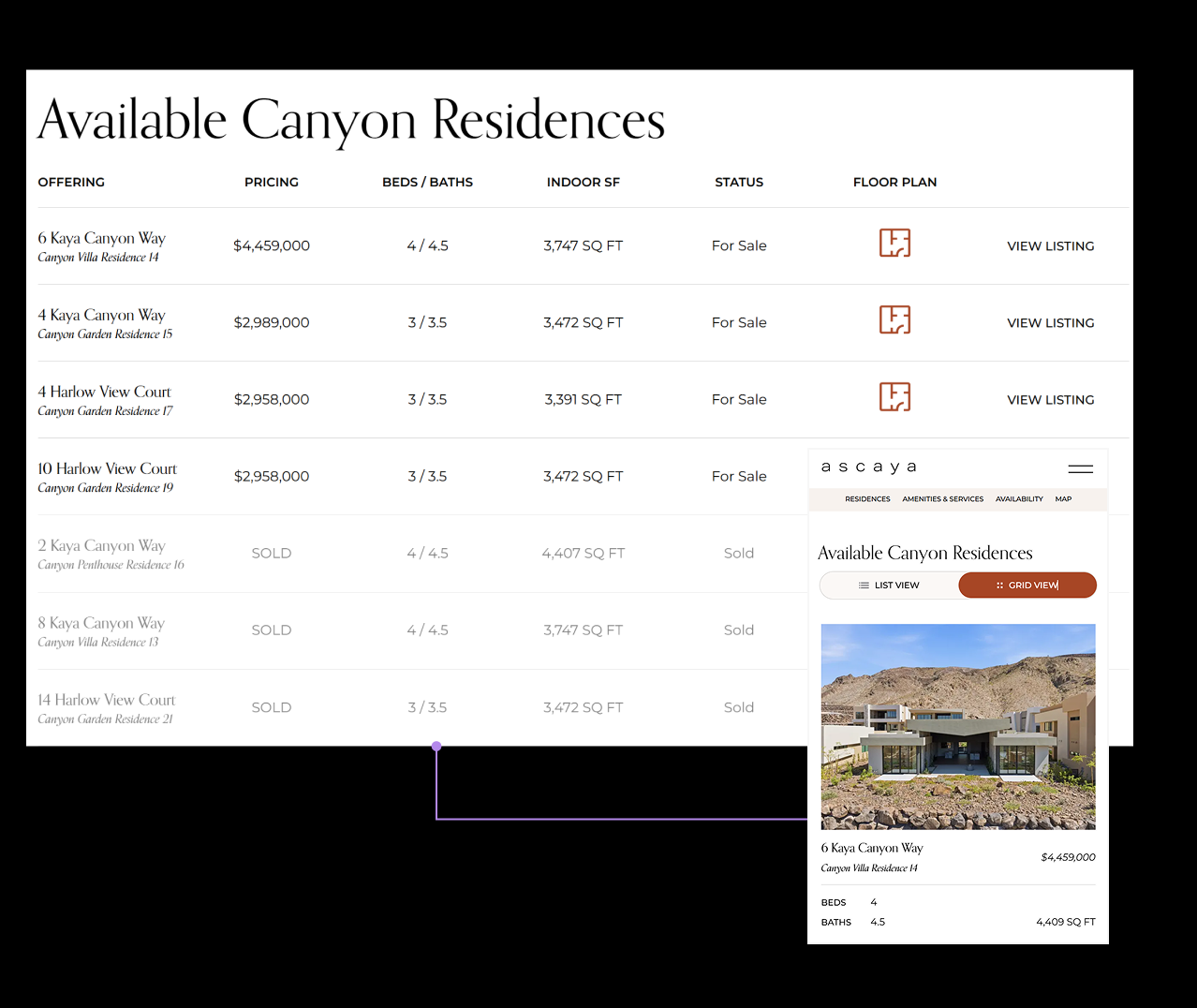
Like most agency projects, the Figma was desktop-only, so the mobile decisions were mine. I flagged the bigger ones back to the designer with suggestions.
Problem
Multi-column tables were unreadable on small screens, and sideways scrolling wasn’t intuitive.
Solution
Below the breakpoint, each table becomes a card grid, with every listing’s details stacked and the floor plan link promoted to a button.
MOTION + PERFORMANCE
Keeping the motion quiet
Ascaya’s brand called for restrained motion, so most of this phase went into performance and production details.
Restrained motion
A GSAP entrance for the hero and header, and slide-out panels for the listing filters, so the homes stay the focus.

Map performance
The map, built by a teammate, plots 100+ lots with live availability. After launch it ran sluggishly, and with no time to learn the code from scratch, I used Claude Code for the first time to review it. It removed duplication, rewrote the slow sections and fixed the lag right away.

Launch essentials
Structured data for every template, accessibility built in, cookie consent, marketing scripts and Gravity Forms connected to the client’s CRM.
AI WORKFLOW
Using AI for the tedious parts
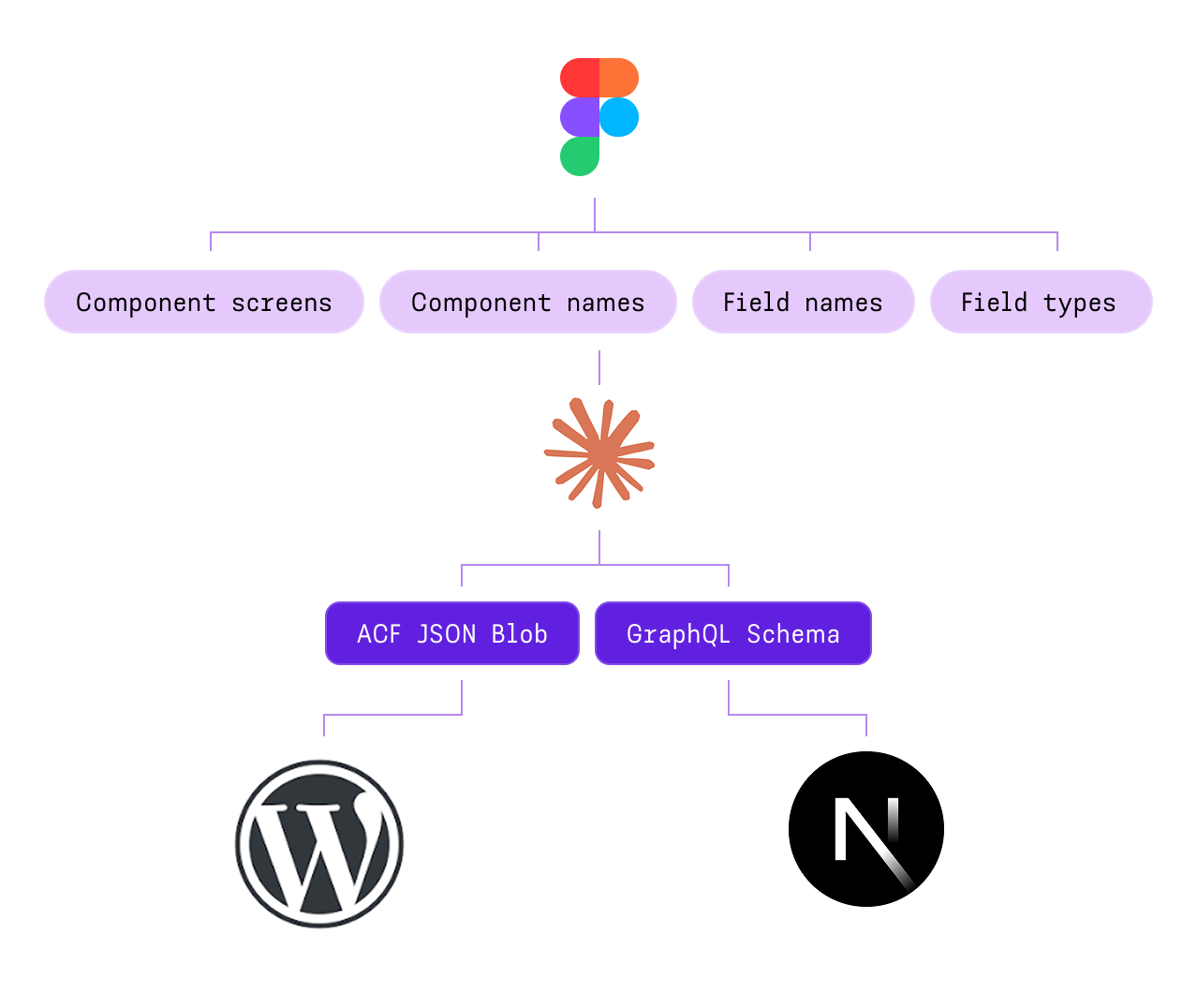
Ascaya was my first build using Claude for schema creation. Once I’d decided a component’s fields, I’d screenshot the section, settle the component name with Claude, and have it generate both the ACF JSON and the matching GraphQL schema.
Writing those by hand and keeping them in sync used to be the most tedious, error-prone part of my job. Handing off the transcription while keeping every architecture decision my own meant fewer missed edge cases and 36 hours cut from the build.
IMPACT
Launching on schedule
The Wicked+ CEO saw the build and couldn’t wait to show the client. The site launched on schedule that spring, the content team took over day-to-day updates, and it scored 100 for accessibility and SEO.
Wicked+ has trusted me with their builds for eight years, and they came back for the next one.
| Flexible components | 25+ blog set, header/footer/modals |
|---|---|
| Pages | 3120 designed, 11 composed from the system |
| Custom post types | Homesites (112) · Design Study homes (6) · Canyon Residences (6) · Amenities (11) |
| Time Estimate | 136 hrs |
| Time Tracked | 100 hrs |
| Post-launch audit | 100 accessibility · 100 SEO (Lighthouse) |
REFLECTION
There’s no formula for deciding whether two sections are the same component. Each call trades editor flexibility against complexity, and the right answer depends on who maintains the site after I leave. It takes me longer during the build, but it saves the team time every time they edit.
The Figma file had no components, variables or auto layout. Would a structured file let Claude cut build time even further? I’m testing that on my own projects.
Next time, I want to give Claude every artboard at once and see whether it can spot the reusable sections on its own. That would cut the first two steps and make my estimates faster.
Update, Oct 2026: That’s what brand-foundation is for. It’s still in progress, but Claude has improved a lot since this build, so spotting reusable sections from the full design is much more realistic now.